Sandbox Management API
Add and reset data in the Corporate Sandbox.
Add and reset data in the Corporate Sandbox.
Credit Notifications sent by HSBC Innovation Banking to report payments received in Corporate accounts.
Cross border payment status tracking via SWIFT gpi.
Transform your business processes by integrating real-time account balances and transactions.
Payment pre-validation provides assurance that payments are being routed to the intended recipient.
You can initiate single and bulk payment instructions using the Payment Initiation API. The API can be used to initiate payments from a specified account to credit single or multiple beneficiaries.
The payment types and end-points available for this API are:
Payments submitted using our Payment Initiation API go through format and payment rule validation before they are sent to payment fulfilment systems for processing.
For Single and Bulk payment with instant receipt, you will receive an acknowledgement as the API response that the initial validations have been successful.
Our Real-time Payment Initiation API provides you with an acknowledgement of the payment being received and settled with the beneficiary bank.
Unless specified otherwise, the information accepted and returned by these APIs is a standardised response as per ISO 20022 Payment Initiation (pain) messaging standards.
pain.001.001.03 Customer Credit Transfer Initiation message is used to request movement of funds from debtor's account to a creditor.
For Real-time Payments in India the payload needs to be provided in a proprietary XML format (XMLPF). This format is only supported for Real-time payment initiation with instant settlement and Payment status enquiry of the RTP payments sent by this format when the supplied payment country is India.
This document provides the guidelines required to enable organisations to implement the HSBC Payment Initiation request and responses into their systems and processes.
Change log and release history:
| Version | Release Date | Status | Description |
|---|---|---|---|
| v1 | December 2018 | Live | Payments API |
| v3 | September 2023 | Live | Specification for OpenAM Implementation - Payment Initiation |
This page will help you to:
The following measures and their components are required to establish a secure connection between HSBC and the API consumer:
| Category | Definition | Components |
|---|---|---|
| Transport Layer Security (TLS) | HTTPS connection | Digital Certificate (SSL) |
| Message Level Security | Data Encryption | PGP Private Key and Public Keys for message encryption |
| API Authentication | Authenticating a customer access to HSBC's API services | Signed and Base64 encoded JWT (JWS) - created by the customer |
| Customer Identification | The customer's profile | Customer Profile ID - provided by HSBC |
To encrypt the communication, the connection between the customers and HSBC uses Transport Layer Security (TLS) via HTTPS as a security protocol. TLS is a cryptographic protocol designed to provide communications security over a computer network.
When the customer requests a HTTPS connection to HSBC, a Digital Certificate is required. This certificate contains the cryptography needed to begin the automatic Secure Sockets Layer (SSL) handshake which involves the generation of shared secrets to establish a uniquely secure connection between the customer and HSBC.
Please ensure your organisation has a valid Digital Certificate from a recognised Certificate Authority before attempting connectivity to our APIs.
In addition to the Transport Layer Security, HSBC adopts additional security on the message being passed through the connection session. Using public-key cryptography and asymmetric encryption, Message Level Encryption provides both your organisation and HSBC with enhanced security for the API message payload.
Public key encryption involves a pair of keys known as a public key and a private key. These keys are assigned to an entity that needs to authenticate its identity electronically, or to sign or encrypt data. Each public key is published and the corresponding private key is kept secret. Data that is encrypted with the public key can only be decrypted with the corresponding private key.
Public key cryptography enables encryption, decryption and non-repudiation. HSBC's APIs support asymmetric encryption that uses a public key to encrypt data and a private key to decrypt data. The public key is available in a trusted certificate, whereas the private key is confidential and not shared.
For Message Encryption purposes, both your organisation and HSBC will need to exchange Public Keys so both parties can decrypt and encrypt messages via the API communication.
PGP is an encryption program that provides cryptographic privacy and authentication for data communication. PGP is used for signing, encrypting, and decrypting texts, e-mails, files, directories, and whole disk partitions and to increase the security of e-mail communications.
For API Message Encryption purposes, the Public PGP Keys have to be exchanged between the API Consumer (Client) and HSBC the API Provider (HSBC).
Clients can generate their own Private Key / Public Key pair using a key generation tool such as GnuPG or GPG.
Public PGP Key Specification:
Once your Certificate is ready, contact your HSBC Client Integration contact to trigger the Key Exchange Procedure.
The Client uses HSBC's Public Key to encrypt a message every time it sends to HSBC. The Client verifies HSBC's digital signature every time a message is received from HSBC. HSBC uses the Client's Public Key to do the same upon messages sent and received from the Client.
For security purposes, HSBC's Public Key is renewed every year and a Certificate Renewal process will be triggered.
| Component | Storage | Validity |
|---|---|---|
| Client's Private Key | The Private Key should be maintained and handled with the most secure approach possible. The most common and yet secure approach is: key password - Do not save the password in plain text or hard-coded in an application. We recommend to encrypt it by any Password Encryption Tools/ key storage - Store inside a password-protected key repository, such as JKS or PKCS12 keystore. The Keystore password should also be encrypted. | There is no Validity Period. However, if the Client suspects there is a chance that the key is leaked, or any other security reason, a new Private Key and its associated Public Key should be generated. |
| Client's Public Key | Since the Public Key is publicly distributed, a moderately secure storage approach is acceptable. The Client can store the physical file in any machine's file system, or for centralised key management - store all keys and certificates in one single key repository. | For a self-signed PGP Public key, the same condition as above applies. However, the validity period of a CA-signed Certificate is depended on the purchase plan of the issuing CA. The most common standard is 1 to 2 years. |
| HSBC's Public Key | Same as above. | The validity period is usually 1 Year plus 1 to 2 months extra. The extra period is a buffer to enable a client to switch a "to-be-expired" certificate to a new one during the PGP Key Renewal Process. |
API Authentication is performed using a signed JSON Web Token (JWT). The token must be provided in the header of the HTTP request every time you invoke HSBC's API services. This ensures only authorised and pre-approved organisations can access and utilise our API services.
The JWT is generated by the customer, not provided by HSBC. There are many utilities available that can provide JWT generation and validation logic for all commonly used programming languages. The following example uses the "io.jsonwebtoken" java library.
What you will need:
The Customer Profile ID is the identifier HSBC provided you during the on-boarding process.
The Private Key is part of your Encryption Key Pair. The Public Key should be shared with HSBC as part of the customer on-boarding process.
For sandbox access, test encryption keys and profile ID will be provided as part of the sandbox project creation.
The below code provides a JWT example in Java:
// Build HSBC JWT Token
Map<string, object=""> claims = new HashMap<>();
long nowSeconds = System.currentTimeMillis() / 1000;

//set customer profile id and JWT body
claims.put("sub", "PC000012345");
claims.put("iat", nowSeconds);
claims.put("aud", "baas");
claims.put("jti", jwtId);
claims.put("payload_hash_alg", "RSASHA256");
//Generate hash code for request payload and put into JWT Token
claims.put("payload_hash", "151202eac315f1323a9ff...");

//set JWT header
Map<string, object=""> header = new HashMap<string, object="">();
header.put("typ", "JWT");
header.put("kid", " D4EFEE13D91D5D42s ");
header.put("alg", "PS256");
header.put("ver", "1.0");

String token = Jwts.builder().setHeader(header).setClaims(claims)
.signWith(clientPrivateKey, SignatureAlgorithm.PS256).compact();The below table defines the fields (“claims”) that should be put inside the JWT header:
| Code | Name | Mandatory | Description | Example |
|---|---|---|---|---|
| typ | Token Type | Yes | MUST set this to “JWT” | JWT |
| kid | Key ID | Yes | Public Key Id which HSBC uses to verify JWT signature. HSBC reads the public key by this key ID, from the PGP key file provided by our customers, to verify JWT signature. | 900864F8C11EB743 |
| alg | Signing Algorithm | Yes | Algorithm to verify the signature on the token. The following algorithms are supported: RS256, RS384, RS512, PS256, PS384, PS512. | PS256 |
| ver | Version | Yes | HSBC private claim. Currently the customer MUST set it as "1.0". | 1.0 |
Note: We recommend the PS256, PS384, and PS512 algorithms over the other RSA algorithms. The PKCS#1.5 padding scheme (RS256, RS384, and RS512) does not provide the desired level of security and generally should be replaced by the PSS padding scheme.
Example structure:
{
    "typ": "JWT",
    "kid": "A9248D0E4A463426",
    "alg": "PS256"
    "ver": "1.0"
}The below table defines the fields (“claims”) that should be put inside the JWT payload:
| Code | Name | Mandatory | Description | Example |
|---|---|---|---|---|
| jti | JWT ID | Yes | Case sensitive unique identifier of the token even among different issuers. There is a negligible probability that the same value will be accidentally assigned to a different data object; if the application uses multiple issuers, collisions MUST be prevented among values produced by different issuers as well. The "jti" claim can be used to prevent the JWT from being replayed. The "jti" value is a case-sensitive string. | 74760410-f963-11e8-b2a3-1bb26e1e5b69 |
| iat | Issued At | Yes | Identifies the time at which the JWT was issued. The value must be a NumericDate. | 1565150776 |
| sub | Subject | Yes | Identifies the subject of the JWT. MUST provide "Customer Profile ID" value | PC000012345 |
| aud | Audience | Yes | Identifies the recipients that the JWT is intended for. Always set it as "baas". | baas |
| payload_hash | Payload hash value | Yes | Hashing value of the HTTP request payload body. This is used for Mule policy to do validation | 1dab559f1f4bf4f3ca... |
| payload_hash_alg | Payload hash algorithm | Yes | Hashing algorithm of the payload_hash. Below algorithm supported:
| RSASHA256 |
Example structure:
{
    "jti": "5ccfd3a0-36a1-11ea-b780-eeee0af2723c",
    "iat": 1578987726,
    "sub": "PC000012345",
    "aud": "baas",
    "payload_hash": "a00ccb...",
    "payload_hash_alg": "RSASHA256",
    "obo":{
         "sub":"USTRSY:PC000000000"
    }
}
This page will help you to:
For each request, prepare the following:
The following section contains an implementation guide with examples.
Use the API reference document to prepare the payload based on the required format for your specific end-point.
Request body examples are provided against each end-point in the API reference documentation - see Endpoints menu.
| Component | Description | Remark |
|---|---|---|
| plainText | Plain HTTP request body (In JSON structure) | Refer to the API Reference Page for each endpoint. |
| encryptionKey | Public Key issued by HSBC | Public Key provided by HSBC during key exchange. |
Steps to encrypt the message payload:
To understand how to construct an Encrypted Message, let's take the Java program below as an example to describe all the required components:
//#2.1 Your plain payload prepared and put into string
public String encryptPlainText(List<PGPPublicKey> publicKeys, String plainText, boolean armor,
                               boolean withIntegrityCheck, boolean isMasterKey)
    throws PGPException, IOException {
  ByteArrayOutputStream out = new ByteArrayOutputStream();
  OutputStream opOut;
  if (armor) {
    opOut = new ArmoredOutputStream(out);
  } else {
    opOut = out;
  }
  ByteArrayOutputStream byteArray = new ByteArrayOutputStream();

//#2.2 Use IOUtils.toInputStream to convert Payload to inputStream.
InputStream inputStream = IOUtils.toInputStream(plainText);
  PGPLiteralDataGenerator generator = new PGPLiteralDataGenerator();
  OutputStream outputStream = generator
      .open(byteArray, PGPLiteralData.BINARY, PGPLiteralData.CONSOLE, inputStream.available(),
          new Date());
  Streams.pipeAll(inputStream, outputStream);
  outputStream.close();
  JcePGPDataEncryptorBuilder c = new JcePGPDataEncryptorBuilder(SymmetricKeyAlgorithmTags.AES_256)
      .setWithIntegrityPacket(withIntegrityCheck).setSecureRandom(new SecureRandom())
      .setProvider("BC");

//#2.3 Retrieve HSBC's Public Key for encryption
  PGPEncryptedDataGenerator dataGenerator = new PGPEncryptedDataGenerator(c);
  PGPPublicKey encryptionKey = null;

//#2.4 Use HSBC's Public Key to encrypted plain payload inputStream
  Iterator keyIter = publicKeys.iterator();
  while (keyIter.hasNext()) {
    PGPPublicKey key = (PGPPublicKey) keyIter.next();
    if (key.isEncryptionKey() && (!key.isMasterKey() || isMasterKey)) {
      encryptionKey = key;
    }
  }
  if (encryptionKey == null) {
    throw new IllegalStateException("matching encrypted data not found");
  }
  JcePublicKeyKeyEncryptionMethodGenerator d =
      new JcePublicKeyKeyEncryptionMethodGenerator(encryptionKey)
          .setProvider("BC").setSecureRandom(new SecureRandom());
  dataGenerator.addMethod(d);
  byte[] bytes = byteArray.toByteArray();
  try (OutputStream dbOut = dataGenerator.open(opOut, bytes.length)) {
    dbOut.write(bytes);
    dbOut.close();
    opOut.close();

//#2.5 Encode crypto text to base64
    return Base64.toBase64String(out.toByteArray());
  }
2.1 Stringnify your plain payload.
2.2 Use IOUtils.toInputStream to convert the Payload to inputStream.
2.3 Retrieve HSBC's Public Key as the encryptor.
2.4 Use HSBC's Public Key to encrypt the plain payload inputStream.
2.5 Encode the crypto text to base64.
Next, let's follow an example to generate the JWS.
The below table defines the fields to be provided in the JWT, all fields are mandatory. Note, for JWT field definitions please see the Securing a Connection page:
| Code | Name | In | Example |
|---|---|---|---|
| typ | Token Type | JWT header | JWT - MUST be set to “JWT” |
| kid | Key Id | JWT header | 900864F8C11EB743 |
| alg | Signing Algorithm | JWT header | PS256 |
| ver | Version | JWT header | 1.0 - MUST be set as "1.0" |
| jti | JWT ID | JWT payload | 74760410-f963-11e8-b2a3-1bb26e1e5b69 |
| iat | Issue At | JWT payload | 1565150776 |
| sub | Subject | JWT payload | PC000012345 |
| aud | Audience | JWT payload | baas |
| payload_hash | Payload hash value | JWT payload | 1dab559f1f4bf4f3ca... |
| payload_hash_alg | Payload hash algorithm | JWT payload | RSASHA256 |
Steps to prepare the JWT:
Following java example can be used to describe the required JWT components:
//3.1 Build the JWT structure
Map<string, object=""> claims = new HashMap<>();
long nowSeconds = System.currentTimeMillis() / 1000;
claims.put("jti", jwtId);
claims.put("iat", nowSeconds);
claims.put("aud", "baas");
claims.put("sub", "PC000012345");

//3.2 Generate hash code for request payload and put into JWT Token
claims.put("payload_hash", "151202eac315f1323a9ff...");
claims.put("payload_hash_alg", "RSASHA256");

//3.3 Set JWT header
Map<string, object=""> header = new HashMap<string, object="">();
header.put("typ", "JWT");
header.put("kid", " D4EFEE13D91D5D42s ");
header.put("alg", "PS256");
header.put("ver", "1.0");

//3.4 Generate and Sign the JWT (JWS)
String token = Jwts.builder().setHeader(header).setClaims(claims)
.signWith(clientPrivateKey, SignatureAlgorithm.PS256).compact();
3.1 Build the JWT structure.
3.2 Generate hash code for encrypted request payload from step 2.
3.3 Form the JWT Header
3.4 Generate and Sign the JWT (JWS)
Next, let's add the JWS to the HTTP Header
Add the JWS to the Authorization header:
Authorization=JWS eyJ2ZXIiOiIxLjAiLCJraWQiOiJBNjI4RjhBRDY3NERCQz..
Responses are returned with the relating HTTP code and an encrypted response message.
Steps to process a response:
Typical encrypted and encoded response envelope:
{
  "profileId": "PC12345678",
  "referenceId": "b7e0fdacd8bd",
  "statusCode": "ACCP",
  "statusDesc": "Accepted Technical Validation (L2)",
  "reportBase64": "PFJlc3BvbnNlPg0KICA8UGF5bWVudElkPmI3ZTBmZGFjLWQ4YmQtNDk1MC1iZDNGljSWQ+UEMxMjM+"
}The following Java program provides an example of how to decrypt the response body:
//#1 Decode the encoded response using Base64
  String epicStrNew = new String(Base64.decode(encryptedStr));
  BufferedInputStream dataStream = new BufferedInputStream(IOUtils
      .toInputStream(epicStrNew));
  InputStream decoderStream = PGPUtil.getDecoderStream(dataStream);

//#2 Build the PGPObjectfactory Object
  PGPObjectFactory pgpObjectFactory =
      new PGPObjectFactory(decoderStream, keyFingerPrintCalculator);

  PGPEncryptedDataList pgpEncryptedDataList =
      (PGPEncryptedDataList) pgpObjectFactory.nextObject();

  // find the matching public key encrypted data packet.
  PGPPublicKeyEncryptedData pgpPublicKeyEncryptedData = null;

//#3 build decryptor factory
  PublicKeyDataDecryptorFactory dataDecryptorFactory = null;
  for (Object pgpEncData : pgpEncryptedDataList) {
    PGPPublicKeyEncryptedData pkEnc = (PGPPublicKeyEncryptedData) pgpEncData;
    for (PGPPrivateKey privateKey : privateKeys) {
      if (pkEnc.getKeyID() == privateKey.getKeyID()) {
        pgpPublicKeyEncryptedData = pkEnc;
        dataDecryptorFactory = new JcePublicKeyDataDecryptorFactoryBuilder().setProvider("BC")
            .build(privateKey);
        break;
      }
    }
  }

  if (pgpPublicKeyEncryptedData == null || dataDecryptorFactory == null) {
    throw new IllegalStateException("matching encrypted data not found");
  }

  InputStream clear = pgpPublicKeyEncryptedData.getDataStream(dataDecryptorFactory);

//#4 Get the plain text by using your private key to decrypt the crypto text
  PGPObjectFactory plainFact = new PGPObjectFactory(clear, new JcaKeyFingerprintCalculator());
  Object message = plainFact.nextObject();

  ByteArrayOutputStream actualOutput = new ByteArrayOutputStream();
  Streams.pipeAll(((PGPLiteralData) message).getInputStream(), actualOutput);
  actualOutput.close();
  clear.close();
  // check data decrypts okay
  if (pgpPublicKeyEncryptedData.verify()) {
    return new String(actualOutput.toByteArray());
  }
  throw new IllegalStateException("Enc data is invalid!");
}
1. Decode the encoded response using Base64.
2. Create the PGPObjectFactory Object.
3. Retrieve your Private Key as the decryption key.
4. Use your private key to decrypt the encrypted response.
Prepare the header parameters as shown below:
| Key | Type | Required | Example Value | Description |
|---|---|---|---|---|
| Content-Type | String | Yes | application/json | This indicate the media type of the resource and the value must be application/json |
| Authorization | String | Yes | JWS eyJraWQiOiI2RjQ0NkQwNEFFRkE4MDYwIiwidHlwIjoiSldUIiwidmVyIjoiMS4wIi | An Authorisation Token as per https://tools.ietf.org/html/rfc7515 |
| x-payload-type | String | Yes | pain.001.001.03 | The payment XML type. |
| x-hsbc-client-id | String | Optional | The x-hsbc-client-id is a legacy parameter and no logner required. | |
| x-hsbc-client-secret | String | Optional | The x-hsbc-client-secret is a legacy parameter and no longer required. |
ISO pain.001.001.03 Specification: HSBC_pain.001.001.03_HighValuePayment
How to prepare the request payload.
paymentBase64{
"paymentBase64":
"PD94bWwgdmVyc2lvbj0iMS4wIiBlbmNvZGluZz0iVVRGLTgiPz4NCjxEb2N1bWVz="
}
The successful response body will contain the following fields:
| Field Name | Description |
|---|---|
| referenceId | Unique Id assigned to the Bulk Payment API. |
| profileId | HSBC API Profile ID |
| statusCode | Status code relating to the response e.g. ACCP |
| statusDesc | Status code description relating to the response |
| responseBase64 | Response XML containing acknowledgement encrypted, signed and Base64 encoded |
200 - ACTC (Technical Acceptance)
|
200 - ACCP (Accepted)
|
200 - PART (Partially Accepted)
|
How to process the response payload:
responseBase64The decoded and decrypted Bulk payment initiation payload content will be provided as an acknowledgement confirming if the file validation has been successful.
CBRR in the header. This header is not required for other currency, account or payment types.Prepare the header parameters as shown below. Please note the additional required header value for Cross Border remittance:
| Key | Type | Required | Example Value | Description |
|---|---|---|---|---|
| Content-Type | String | Yes | application/json | This indicate the media type of the resource and the value must be application/json |
| Authorization | String | Yes | JWS eyJraWQiOiI2RjQ0NkQwNEFFRkE4MDYwIiwidHlwIjoiSldUIiwidmVyIjoiMS4wIi | An Authorisation Token as per https://tools.ietf.org/html/rfc7515 |
| x-payload-type | String | Yes | pain.001.001.03 | The payment XML type. |
| x-hsbc-payment-type | String | No | CBRR | For INR Vostro accounts a special header is required for Cross border remittance (value should be CBRR). This header is not required for other currency, account or payment types. Please omit this header for all currency, account and payment types except INR Vostro cross border payments. |
| x-hsbc-client-id | String | Optional | The x-hsbc-client-id is a legacy parameter and no longer required. | |
| x-hsbc-client-secret | String | Optional | The x-hsbc-client-secret is a legacy parameter and no longer required. |
ISO pain.001.001.03 Specification: HSBC_pain.001.001.03_HighValuePayment
How to prepare the request payload.
paymentBase64{
"paymentBase64":
"PD94bWwgdmVyc2lvbj0iMS4wIiBlbmNvZGluZz0iVVRGLTgiPz4NCjxEb2N1bWVz="
}
The successful response body will contain the following fields:
| Field Name | Description |
|---|---|
| referenceId | Unique Id assigned to the Payment API. |
| profileId | HSBC API Profile ID |
| statusCode | Status code relating to the response e.g. ACCP |
| statusDesc | Status code description relating to the response |
| responseBase64 | Response XML containing acknowledgement encrypted, signed and Base64 encoded |
200 - ACTC (Technical Acceptance)
|
200 - ACCP (Accepted)
|
200 - PART (Partially Accepted)
|
How to process the response payload:
responseBase64The decoded and decrypted payment initiation payload content will be provided as an acknowledgement confirming if the file validation has been successful.
Prepare the header parameters as shown below. Please note the variance for country payment types:
| Key | Type | Required | Example Value | Description |
|---|---|---|---|---|
| Content-Type | String | Yes | application/json | This indicate the media type of the resource and the value must be application/json |
| Authorization | String | Yes | JWS eyJraWQiOiI2RjQ0NkQwNEFFRkE4MDYwIiwidHlwIjoiSldUIiwidmVyIjoiMS4wIi | An Authorisation Token as per https://tools.ietf.org/html/rfc7515 |
| x-payload-type | String | Yes | pain.001.001.03 | The payment XML type. pain.001.001.09 is only for SEPA Instant Payments |
| x-hsbc-client-id | String | Optional | The x-hsbc-client-id is a legacy parameter and no longer required. | |
| x-hsbc-client-secret | String | Optional | The x-hsbc-client-secret is a legacy parameter and no longer required. | |
| x-hsbc-payment-type | String | No | FPS | Required value of FPS for UK Faster Payment SCT for SEPA Instant Payment Required value of RTP for US Real-time Payment |
| x-hsbc-country-code | String | No | GB | Required value of GB for UK Faster Payment Required value of US for US Real-time Payment |
| x-hsbc-subscription-id | String | No | Unique Id for Push Notification. Applicable only for US Real-Time Payment. |
ISO pain.001.001.03 Specification: HSBC_pain.001.001.03_HighValuePayment
How to prepare the request payload.
paymentBase64{
"paymentBase64":
"PD94bWwgdmVyc2lvbj0iMS4wIiBlbmNvZGluZz0iVVRGLTgiPz4NCjxEb2N1bWVz="
}
The successful response body will contain the following fields:
| Field Name | Description |
|---|---|
| referenceId | Unique Id assigned to the Payment API. |
| profileId | HSBC API Profile ID |
| statusCode | Status code relating to the response e.g. ACSC |
| statusDesc | Status code description relating to the response |
| responseBase64 | Response XML containing acknowledgement encrypted, signed and Base64 encoded |
200 - ACCP (Accepted Instruction Validation(L2))
|
200 - ACSC (Accepted Settlement Completed)
|
How to process the response payload:
responseBase64The decoded and decrypted payment initiation payload content will be provided as an acknowledgement confirming if the settlement has completed and been accepted by the beneficiary bank.
IN and Payment Type of IMPSRTP in the header.Prepare the header parameters as shown below. Please note the additional required header value for Cross Border remittance:
| Key | Type | Required | Example Value | Description |
|---|---|---|---|---|
| Content-Type | String | Yes | application/json | This indicate the media type of the resource and the value must be application/json |
| Authorization | String | Yes | JWS eyJraWQiOiI2RjQ0NkQwNEFFRkE4MDYwIiwidHlwIjoiSldUIiwidmVyIjoiMS4wIi | An Authorisation Token as per https://tools.ietf.org/html/rfc7515 |
| x-payload-type | String | Yes | XMLPF | The payment XML type. |
| x-hsbc-unique-ref-id | String | Yes | UETR11E | Unique ID for the payment initiated through Payment API |
| x-hsbc-payment-type | String | Yes | IMPSRTP | Payment type code of Immediate Payments System |
| x-hsbc-country-code | String | Yes | IN | Required value of IN for Immediate Payments System |
| x-hsbc-client-id | String | Optional | The x-hsbc-client-id is a legacy parameter and no longer required. | |
| x-hsbc-client-secret | String | Optional | The x-hsbc-client-secret is a legacy parameter and no longer required. |
This API supports a proprietary XML (XMLPF) format applicable only for India RTP API.
This format is supported for 'Real Time Payment Initiation with instant settlement' and 'Payment Status Enquiry' of the Real-time payments sent by this format only when country is India.
All parameters are case sensitive and are required to be captured in sequential order as per specifications. Optional parameters can be omitted from the XML structure:
| Field | Description | Type | Max Length | Required | Example |
|---|---|---|---|---|---|
| SERVICEPROVIDERID | Mobile Service provider name | Alpha Numeric | 12 | Mandatory | PC000058828 |
| REQUESTID | Remitter reference number – Any unique reference number on the remitter Site | Alpha Numeric | 50 | Mandatory | 06MAR20200001 |
| REQUESTTYPE | R-Request, expected value is R | Alpha Numeric | 1 | Mandatory | R |
| REMITTORACCOUNTNO | Customer Debit Account number | Alpha Numeric | 50 | Mandatory | 002164549004 |
| REMITTORNAME | Remittor name | Alpha Numeric | 50 | Optional | |
| REMITTORMOBILENUMBER | Registered Remitter Mobile Number, either send numeric value or do not send the tag | Numeric | 12 | Optional | |
| REMITTORMMID | Remitter MMID | Alpha Numeric | 7 | Optional | |
| BENEFICIARYBANKIFSC | Beneficiary IFSC code | Alpha Numeric | 11 | Mandatory | DNSB0000001 |
| BENEFICIARYACCOUNTNO | Beneficiary account number | Alpha Numeric | 50 | Mandatory | 123456789012 |
| AMOUNT | Rupees with decimal | Alpha Numeric | 12 | Mandatory | 1 |
| REMARK | To specify remark | Alpha Numeric | 50 | Optional | |
| CHANNELID | Expected value should be = CDP | Alpha Numeric | 4 | Mandatory | CDP |
| AUTHENTICATIONTOKEN | Capture Dummy value | Alpha Numeric | 40 | Mandatory | 1234 |
| ADDITIONALINFO1 | Narratives | Alpha Numeric | 50 | Optional | |
| ADDITIONALINFO2 | Required if Smart Routing is setup for the customer, Expected value- Beneficiary name | Alpha Numeric | 50 | Optional | P3ACustomer |
| ADDITIONALINFO3 | Narratives | Alpha Numeric | 50 | Optional | |
| ADDITIONALINFO4 | Narratives | Alpha Numeric | 50 | Optional | |
| ADDITIONALINFO5 | Narratives | Alpha Numeric | 50 | Optional | |
| ADDITIONALINFO6 | Future Use | Alpha Numeric | 50 | Optional | |
| ADDITIONALINFO7 | Required if Penny transaction is setup for the customer, possible values : 'P' and when Amount is 1 | Alpha Numeric | 6 | Optional | P |
| BENEFICIARYEMAILID | Future Use | Alpha Numeric | 100 | Optional | |
| BENEFICIARYMOBILENUMBER | Future Use, either send numeric value or do not send the tag | Numeric | 12 | Optional | |
| MERCHANTID | Future Use | Alpha Numeric | 20 | Optional | |
| SUBMERCHANTCODE | Future Use | Alpha Numeric | 20 | Optional | |
| ORDERINGPARTYID | Future Use | Alpha Numeric | 50 | Optional | |
| SOURCECHANNEL | Future Use | Alpha Numeric | 20 | Optional |
<?xmlversion='1.0'encoding='windows-1252'?>
<p2aRequest>
  <SERVICEPROVIDERID>PC000016070</SERVICEPROVIDERID>
  <REQUESTID>IMPS0001000001D073000005050025</REQUESTID>
  <REQUESTTYPE>R</REQUESTTYPE>
  <REMITTORACCOUNTNO>073048084001</REMITTORACCOUNTNO>
  <BENEFICIARYBANKIFSC>HDFC0000007</BENEFICIARYBANKIFSC>
  <BENEFICIARYACCOUNTNO>073048084001</BENEFICIARYACCOUNTNO>
  <AMOUNT>1</AMOUNT>
  <CHANNELID>CDP</CHANNELID>
  <AUTHENTICATIONTOKEN>1234</AUTHENTICATIONTOKEN>
</p2aRequest>
How to prepare the request payload.
paymentBase64{
"paymentBase64":
"PD94bWwgdmVyc2lvbj0iMS4wIiBlbmNvZGluZz0iVVRGLTgiPz4NCjxEb2N1bWVz="
}
The successful encrypted and encoded response body will contain the following fields:
| Field Name | Description |
|---|---|
| referenceId | Unique Id assigned to the Payment API. |
| profileId | HSBC API Profile ID |
| statusCode | Status code relating to the response e.g. ACSC |
| statusDesc | Status code description relating to the response |
| responseBase64 | Response XML containing acknowledgement encrypted, signed and Base64 encoded |
200 - ACSC (Accepted Settlement Completed)
|
How to process the response payload:
responseBase64The decoded and decrypted payment initiation payload content will be provided as an acknowledgement confirming if the settlement has completed and been accepted by the beneficiary bank.
| Field | Description | Type | Max Length | Required | Example |
|---|---|---|---|---|---|
| REQUESTID | Remitter reference number – Any unique reference number on the remitter Site | Alpha Numeric | 50 | Mandatory | 06MAR20200001 |
| REQUESTTYPE | R-Request | Alpha Numeric | 1 | Mandatory | R |
| REMITTORACCOUNTNO | Account Number | Alpha Numeric | 50 | Mandatory | 002164549004 |
| MERCHANTID | Future use | Alpha Numeric | 20 | Optional | HSBC000000000288 |
| RESPONSECODE | IMPS internal codes | Alpha Numeric | 2 | Mandatory | 00 |
| RESPONSEDESCRIPTION | Description of the response code | Alpha Numeric | 50 | Mandatory | Successful Transaction |
| RRN | Reference number | Numeric | 12 | Optional | |
| BENEFICIARYNAME | Beneficiary name | Alpha Numeric | 50 | Optional | |
| TRANSACTIONDATETIME | Date and Time of the Transaction. DDMMYYYYhhmms | Alpha Numeric | 14 | Mandatory | 20200403182414 |
| AUTHENTICATIONTOKEN | Capture Dummy Value | Alpha Numeric | 40 | Mandatory | 1234 |
| ADDITIONALINFO1 | Future use | Alpha Numeric | 50 | Optional | |
| ADDITIONALINFO2 | Future use | Alpha Numeric | 50 | Optional | |
| ADDITIONALINFO7 | Future use | Alpha Numeric | 6 | Optional |
<p2aResponse>
  <REQUESTID>zwCjcJuci7nIjk2a</REQUESTID>
  <REQUESTTYPE>R</REQUESTTYPE>
  <REMITTORACCOUNTNO>002197994001</REMITTORACCOUNTNO>
  <MERCHANTID>123</MERCHANTID>
  <RESPONSECODE>00</RESPONSECODE>
  <RESPONSEDESCRIPTION>Successful</RESPONSEDESCRIPTION>
  <RRN>012119135399</RRN>
  <BENEFICIARYNAME>P3ACustomer</BENEFICIARYNAME>
  <TRANSACTIONDATETIME>20200430194741</TRANSACTIONDATETIME>
  <AUTHENTICATIONTOKEN>@@@</AUTHENTICATIONTOKEN>
  <ADDITIONALINFO1>INDIA VIX</ADDITIONALINFO1>
  <ADDITIONALINFO2>Creditor Name Test Bene Account EQ 20</ADDITIONALINFO2>
  <ADDITIONALINFO7>A</ADDITIONALINFO7>
</p2aResponse>
/payments/instant-receipt and /bulk-payments/instant-receipt end points.Prepare the header parameters as shown below:
| Key | Type | Required | Example Value | Description |
|---|---|---|---|---|
| Content-Type | String | Yes | application/json | This indicate the media type of the resource and the value must be application/json |
| Authorization | String | Yes | JWS eyJraWQiOiI2RjQ0NkQwNEFFRkE4MDYwIiwidHlwIjoiSldUIiwidmVyIjoiMS4wIi | An Authorisation Token as per https://tools.ietf.org/html/rfc7515 |
| x-hsbc-client-id | String | Optional | The x-hsbc-client-id is a legacy parameter and no longer required. | |
| x-hsbc-client-secret | String | Optional | The x-hsbc-client-secret is a legacy parameter and no longer required. | |
| x-hsbc-payment-type | String | Optional | IMPSRTP | Specify an unique payment type element. It's used for IMPS RTP Payment status enquiry and should be 'IMPSRTP' when provided. |
| x-payload-type | String | Conditional | XMLPF | Payment products with payment information in proprietary XML format. It's required for IMPS RTP payment status enquiry. |
| x-hsbc-unique-ref-id | String | Conditional | UETR11E | Unique ID for the payment initiated through Payment API. It's required for IMPS RTP payment status enquiry. |
| x-hsbc-country-code | String | Conditional | IN | Codes for the representation of names of countries and their subdivisions. This code must be in ISO 3166-2:2020 format and in upper case. It's required for IMPS RTP payment status enquiry. |
Prepare the request payload following the below message structure, please note the field names are case sensitive.
<StatusEnquiry>
  <ProfileID>PC000001111</ProfileID>
  <Key>
    <ReferenceID>0137fb84-b66d-40fb-9a4f-1c7d62288ff9</ReferenceID>
    <MessageID></MessageID>
    <PmtInfID></PmtInfID>
    <InstructionID></InstructionID>
    <EndToEndID></EndToEndID>
  </Key>
</StatusEnquiry>
The various reference input parameters are defined below:
| Parameter (Case sensitive) | Required? | Description |
|---|---|---|
| ProfileID | Yes | HSBC Profile ID for Payments API Access |
| ReferenceID | Conditional | Bank reference generated and returned in the response of payment initiation API. |
| MessageID | Conditional | File reference corresponding to the value provided in the original XML payment field <MsgID>. |
| PmtInfID | Conditional | Batch reference corresponding to the value provided in the original XML payment field <PmtInfID>. |
| InstructionID | Conditional | Instruction reference corresponding to the value provided in the original XML payment field <InstrID>. |
| EndToEndID | Conditional | End-to-End reference corresponding to the value provided in the original XML payment field <EndToEndID>. |
How to prepare the request payload.
paymentEnquiryBase64{
"paymentEnquiryBase64":
"PD94bWwgdmVyc2lvbj0iMS4wIiBlbmNvZGluZz0iVVRGLTgiPz4NCjxEb2N1bWVz="
}
The successful response body will contain the following fields:
| Field Name | Description |
|---|---|
| referenceId | Unique Id assigned to the Payment API. |
| profileId | HSBC API Profile ID |
| statusCode | Status code relating to the response e.g. ACCP |
| statusDesc | Status code description relating to the response |
| responseBase64 | Response XML containing acknowledgement encrypted, signed and Base64 encoded |
200 - ACCP (Accepted)
|
This message represents the L2 acknowledgement that the instruction has passed validation and has been accepted. The below table defines the possible status codes and descriptions.
| Code | Description |
|---|---|
| ACTC | Accepted Technical Validation (L1) - Authentication and syntactical and semantical validation are successful. |
| ACCP | Accepted Instruction Validation (L2) - Description: Preceding check of instruction validation was successful. Customer profile check was also successful. |
| ACWC | Accepted with condition - Instruction is accepted but a change will be made, such as value date rolled over. |
| PART | Partially Processed - A number of transactions have been accepted, whereas another number of transactions have not yet achieved 'accepted' status. |
| ACSP | Accepted Settlement In Process - All preceding checks such as technical validation and customer profile were successful and therefore the payment initiation has been accepted for execution. |
| ACSC | Accepted Settlement Completed - Settlement on the account has been completed/Payment has been accepted by the beneficiary bank and will be credited to the beneficiary. |
| RJCT | Rejected - Rejected Payment initiation or individual transaction included in the payment initiation has been rejected. |
| PDNG | Time-Out - There is Delay/Time out/Your payment is pending processing. Please check subsequent status using Payment status enquiry API and by checking your account. |
How to process the response payload:
responseBase64The actual payload content will be in ISO 20022 pain.002.001.03 format as shown below.
Link to document: HSBC_pain_002_001_03_PaymentStatusReportCombined_Core.pdf
|
/payments/instant-settlement endpoint.Prepare the header parameters as shown below:
| Key | Type | Required | Example Value | Description |
|---|---|---|---|---|
| Authorization | String | Yes | JWS eyJraWQiOiI2RjQ0NkQwNEFFRkE4MDYwIiwidHlwIjoiSldUIiwidmVyIjoiMS4wIi | An Authorisation Token as per https://tools.ietf.org/html/rfc7515 |
| x-reference-id | String | Yes | The unique reference id provided by bank in the payment initiation response | |
| x-hsbc-payment-type | String | Yes | FPS | Specify an unique payment type element. - FPS (UK Faster Payment) - SCT (SEPA Payment) - RTP (US Payment) |
| x-hsbc-client-id | String | Optional | The 'x-hsbc-client-id' is a legacy parameter and no longer required. | |
| x-hsbc-client-secret | String | Optional | The x-hsbc-client-secret is a legacy parameter and no longer required. | |
| x-hsbc-country-code | String | Optional | GB | Codes for the representation of names of countries and their subdivisions. This code must be in ISO 3166-2:2020 format and in upper case. - GB for UK Faster Payment - US for US Real-time Payments |
The successful response body will contain the following fields:
| Field Name | Description |
|---|---|
| referenceId | Unique Id assigned to the Payment API. |
| profileId | HSBC API Profile ID |
| statusCode | Status code relating to the response e.g. ACCP |
| statusDesc | Status code description relating to the response |
| responseBase64 | Response XML containing acknowledgement encrypted, signed and Base64 encoded |
200 - ACCP (Accepted)
|
| Code | Description |
|---|---|
| ACCP | Accepted Instruction Validation (L2) - Preceding check of instruction validation was successful. Customer profile check was also successful. |
| ACSP | Accepted Settlement In Process - All preceding checks such as technical validation and customer profile were successful and therefore the payment initiation has been accepted for execution. |
| ACSC | Accepted Settlement Completed - Settlement on the account has been completed/Payment has been accepted by the beneficiary bank and will be credited to the beneficiary. |
| RJCT | Rejected - Rejected Payment initiation or individual transaction included in the payment initiation has been rejected. |
| PDNG | Time-Out - There is Delay/Time out/Your payment is pending processing. Please check subsequent status using Payment status enquiry API and by checking your account. |
How to process the response payload:
responseBase64The actual payload content will be in ISO 20022 pain.002.001.03 format as shown below.
Link to document: HSBC_pain_002_001_03_PaymentStatusReportCombined_Core.pdf
|
To experiment with the Corporate Sandbox, first create a project. This will generate the Client Credentials and Encryption Keys required for authentication when calling the Sandbox APIs.
To create your first project, please follow the Dev Hub link that can be found on the top right of the screen in the main navigation.
The Dev Hub is the central location to manage your Sandbox projects and allow administrators to add and remove members to your organisation within the Developer Portal.
See also:
Detailed User Guide for Sandbox projects
Detailed Guide to Sandbox Data Management
We support 2 types of response in the Corporate Sandbox:
Mock Sandbox returns a static file-based mock response to the requested endpoint. These endpoints can be used for rapid testing whilst you are preparing your encryption module to use with the smart sandbox.
x-hsbc-profile-id to trigger a successful mock response.Mock Sandbox URL: https://sandbox.corporate-api.hsbc.com/mock/{version}/{treasury api endpoint}
Example cURL script:
curl --location --request POST 'https://sandbox.corporate-api.hsbc.com/mock/v2/balances' \
--header 'Content-Type: application/json' \
--header 'x-hsbc-client-id: mock-clientId' \
--header 'x-hsbc-client-secret: mock-secret' \
--header 'x-report-type: JSON' \
--header 'x-hsbc-profile-id: 200';
Smart Sandbox is a full testing environment. It returns a validated response from the database based on the request body content.
Smart Sandbox URL: https://sandbox.corporate-api.hsbc.com/{version}/{treasury api endpoint}
A postman collection is available to download at the below link to help get started with the smart sandbox:
The following test accounts have been added to the Smart Sandbox default dataset. Please use these accounts when preparing your test payload.
Currently there are two Sandbox Accounts per country.
| accountNumber | accountCountry | institutionCode | accountType | bic |
|---|---|---|---|---|
| 10000001 | GB | HBEU | CA | MIDLGB22XXX |
| 10000002 | GB | HRFB | CA | HBUKGB4BXXX |
| 339200000003 | HK | HBAP | CA | HSBCHKHHHKH |
| 339200000004 | HK | HBAP | CA | HSBCHKHHHKH |
| 1234000000000000005 | CN | HBAP | CA | HSBCCNSHXXX |
| 1234000000000000006 | CN | HBAP | CA | HSBCCNSHXXX |
| 146000000007 | SG | HBAP | CA | HSBCSGSGXXX |
| 146000000008 | SG | HBAP | CA | HSBCSGSGXXX |
| 146000000009 | IN | HBAP | CA | HSBCINBBXXX |
| 146000000010 | IN | HBAP | CA | HSBCINBBXXX |
| 1100000011 | US | HBUS | CA | MRMDUS33XXX |
| 1100000012 | US | HBUS | CA | MRMDUS33XXX |
| 021580000000000130 | MX | HBMI | CA | BIMEMXMMXXX |
| 021580000000000143 | MX | HBMI | CA | BIMEMXMMXXX |
| 220000000015 | AE | HBME | CA | BBMEAEADXXX |
| 220000000016 | AE | HBME | CA | BBMEAEADXXX |
For customers require API Guide in Chinese for Payments and Account Information APIs (OpenAM version only), please refer here.
Allows Third Parties to register their client with HSBC's Open Banking platform
create a notification event when resource change in the Bank using Open Banking APIs
In this document, you'll find the steps your organization needs to take to use our API services. Also in this guide are details of request and response messages used to support your organization’s integration.
The intended audience for this document are Technical Architects, Development Engineers, Test Engineers, and Operation & Maintenance Engineers involved in development and support of your organization’s integration.
Setting up our API Services is best completed with the assistance of your organization’s IT team, or someone with experience and knowledge of application programming interfaces. This should include experience with - JSON payloads and security and public key infrastructure (PKI).
Click on the Left Menu to explore the following topics:
| Topics | This page will help you to: | References |
|---|---|---|
| API Specification |
|
|
| Securing a Connection |
|
|
| Making an API Request |
|
|
| Response Codes and Formats |
|
|
| Sandbox Access |
|
Coming soon.* *The sandbox environment for the latest version is not available yet. However, you may try out earlier version. |
Change log and release history:
| Version | Release Date | Status | Description |
|---|---|---|---|
| v1 | December 2021 | To be deprecate | Seller Loans - First Release |
This page will help you to:
Clients can generate their own Private Key / Public Key pair using a key generation tool such as GnuPG or GPG.
Once your Certificate is ready, contact your HSBC Client Integration contact to trigger the Key Exchange Procedure.
The Client uses HSBC's Public Key to encrypt a message every time it sends to HSBC. The Client verifies HSBC's digital signature every time a message is received from HSBC. HSBC uses the Client's Public Key to do the same upon messages sent and received from the Client.
For security purposes, HSBC's Public Key is renewed every year and a Certificate Renewal process will be triggered.
| Component | Storage | Validity |
|---|---|---|
| Client's Private Key | The Private Key should be maintained and handled with the most secure approach possible. The most common and yet secure approach is: key password - Do not save the password in plain text or hard-coded in an application. We recommend to encrypt it by any Password Encryption Tools/ key storage - Store inside a password-protected key repository, such as JKS or PKCS12 keystore. The Keystore password should also be encrypted. | There is no Validity Period. However, if the Client suspects there is a chance that the key is leaked, or any other security reason, a new Private Key and its associated Public Key should be generated. |
| Client's Public Key | Since the Public Key is publicly distributed, a moderately secure storage approach is acceptable. The Client can store the physical file in any machine's file system, or for centralised key management - store all keys and certificates in one single key repository. | For a self-signed PGP Public key, the same condition as above applies. However, the validity period of a CA-signed Certificate is depended on the purchase plan of the issuing CA. The most common standard is 1 to 2 years. |
| HSBC's Public Key | Same as above. | The validity period is usually 1 Year plus 1 to 2 months extra. The extra period is a buffer to enable a client to switch a "to-be-expired" certificate to a new one during the PGP Key Renewal Process. |
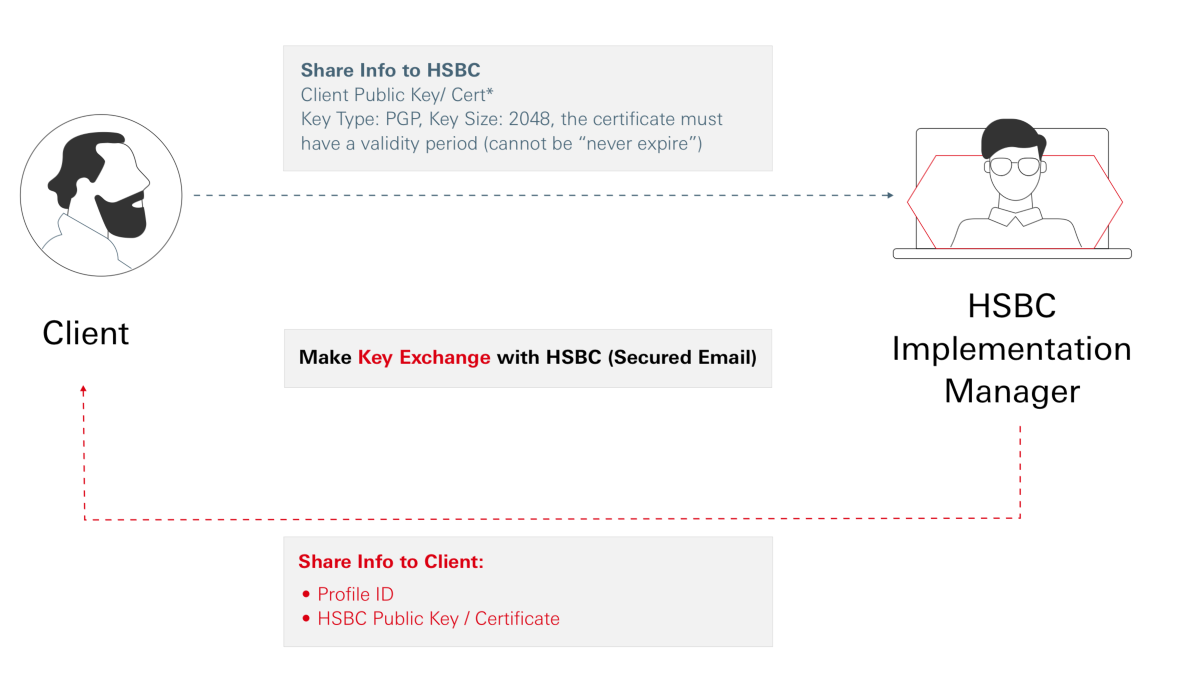
If API connectivity suits your business needs, you’ll need to contact HSBC Client Integration Team to setup your organization for using our API services.
Once setup is complete, you’ll receive a unique profile for your organization i.e. Profile ID, via secure email. These profiles are used to construct the authentication token which must be provided in the header of the HTTP request every time you invoke our APIs.
Both yourself and HSBC will need to securely exchange the Public Key Certificate for Message Encryption purposes. As part of the setup you’ll receive HSBC's public key via secure email.
In this document, you'll find the steps your organization needs to take to use our API services. Also in this guide are details of request and response messages used to support your organization’s integration.
The intended audience for this document are Technical Architects, Development Engineers, Test Engineers, and Operation & Maintenance Engineers involved in development and support of your organization’s integration.
Setting up our API Services is best completed with the assistance of your organization’s IT team, or someone with experience and knowledge of application programming interfaces. This should include experience with - JSON payloads and security and public key infrastructure (PKI).
Click on the Left Menu to explore the following topics:
| Topics | This page will help you to: | References |
|---|---|---|
| API Specification |
|
|
| Securing a Connection |
|
|
| Making an API Request |
|
|
| Response Codes and Formats |
|
|
| Sandbox Access |
|
Coming soon.* *The sandbox environment for the latest version is not available yet. However, you may try out earlier version. |
Change log and release history:
| Version | Release Date | Status | Description |
|---|---|---|---|
| v1 | December 2021 | To be deprecate | TradePay - First Release |
| v3 | June 2024 | Live | JSON Structure Refinement according to latest Bank Standard. |