Introduction
HSBC has made all reasonable efforts to apply the CNBV standard to its Mexico Open Banking implementation. Therefore, Data Requesters should start with documentation published by the CNBV.
This documentation covers specific areas we want to provide further detail on in order to help you to register your app, obtain access tokens and complete API journeys.
Registration
There are two main elements in the process of registering your app for our production APIs.
1. Software Statement Assertion (SSA) generation
Generation of a SSA is completed within develop.hsbc and tells us that you’ve registered as a developer and accepted our terms and conditions. You’ll be required to use the SSA generated on develop.hsbc as part of the Dynamic Client Registration (DCR) process described below.
To generate a SSA, please open your Dashboard and follow the instructions provided.
The SSA will be valid for 365 days. Please copy it and complete the DCR process before it expires.
If you need to re-register your app at any point, you can generate a new SSA in the same way.
Generation of a new SSA will overwrite the previous SSA.
2. Dynamic Client Registration
We’ve implemented v3.2 of the OBIE Dynamic Client Registration specification. The sequence diagram below shows the steps involved.
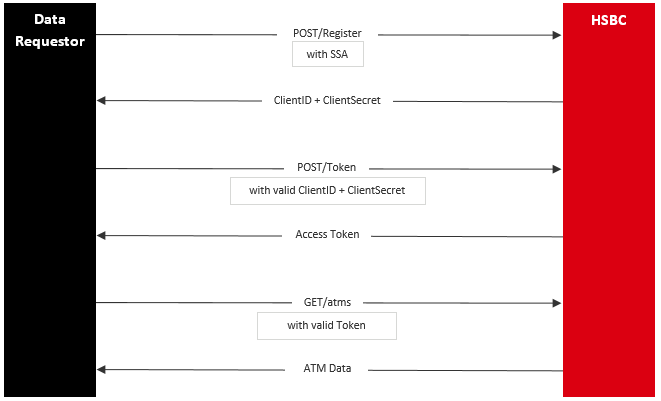
| Endpoint | URL |
|---|---|
| POST /register | https://api.ob.hsbc.com.mx/obie/open-banking/v1.0/oauth2/register |
Initiate the DCR process by calling the URL above.
Please note the DCR content-type should be application/jose.
Please note the JWT expiry parameter (exp) in the request body should be set to a maximum of 30 minutes.
Following successful DCR, you’ll be provided with a ClientId and ClientSecret.
Example DCR request
| Data Field |
Value/Sample Value | Comments |
|---|---|---|
| iss | SSAID | To obtain this value, decrypt the SSA generated on develop.hsbc (you can use the tool: https://jwt.io/) and use the value "software_client_id" |
| aud | https://api.ob.hsbc.com.mx | |
| scope | OPENDATA | |
| grant_types | client_credentials | |
| application_type | web | |
| token_endpoint_auth_method | client_secret_basic | |
| software_id | l91e7aa0k77xwge97vt2q |
To obtain this value, decrypt the SSA generated on develop.hsbc (you can use the tool: https://jwt.io/) and use the value "software_client_id" |
| software_statement | SSA generated for below json | Use the SSA generated on develop.hsbc |
| exp | 1674206304 | Indicates when the JWT expires (used for validation during DCR) |
| iat | 1555506046 | Indicates the time when the JWT was created |
| jti | 45903DAE-3174-4E9E-9047-BBAE9C1A723F |
Access
We’ve implemented the end point below to obtain access tokens.
| Endpoint | URL |
|---|---|
| POST /token | https://api.ob.hsbc.com.mx/obie/open-banking/v1.0/oauth2/token |
Using the ClientId and ClientSecret provided by the DCR process, call the POST /token end point in order to obtain an access token.
Each access token will be valid for 30 days.
Please note that the audience, “aud” value in JWT for the /token endpoint should be: https://api.ob.hsbc.com.mx
Sample curl
curl --location --request POST 'https://api.ob.hsbc.com.mx/obie/open-banking/v1.0/oauth2/token' \
--header 'Content-Type: application/x-www-form-urlencoded' \
--header 'Authorization: Basic ODY3ODU4OWEtNWc5Ni00ODQxLTg2MzctOWRlMWY0OWFiZGVnOm40bXR1Vk1hLXFrVWhvblNoaG5Wcl
BLWVJzUW9CdjkxbkRCWkY0TVlUYTg5cVBlYm9rZHBRSGxIa2M3Z214TDQwWFNyeDZubUF5MGl6a24zb
DNkbi13' \
--data-urlencode 'grant_type=client_credentials' \
--data-urlencode 'scope=OPENDATA'
Fulfilment
We’ve implemented the fulfilment end points below, as per the CNBV contract.
| Endpoints | URL |
|---|---|
| GET /atms | https://api.ob.hsbc.com.mx/atms |
| HEAD /atms | https://api.ob.hsbc.com.mx/atms |
Use an access token each time you call the URLs above.
Sample curl
curl -X GET "https://api.ob.hsbc.com.mx/atms" -H "accept: application/json" -H "authorization: Bearer 1ee7d876-970c-4b1d-ab72-3b6a3eee704a"
In line with regulatory requirements, ATM data will be updated every 24 hrs.
Error Messages
| Error Code | Description |
|---|---|
| 400 | You have sent a request which could not be understood. |
| 408 | Your client has failed to submit a request and a timeout has occurred. |
| 429 | You have requested this resource too often. |
| 500 | An error occurred on the server. |
| 503 | The service is temporarily unavailable. |